The Ring Alarm Pack S is the best smart alarm system for most UK flats and smaller homes: it combines a proper base station, keypad, contact sensor, motion detector and range extender with a clear app and a large accessory range. Choose a larger pack rather than adding sensors one by one if you have several ground-floor entry points; for buyers who want a visible external siren from day one, the ERA Protect Alert is the stronger starting kit.
The important distinction is not simply DIY versus professional. It is whether the box covers the doors and rooms that matter, what still works during a broadband or power failure, and who acts when an alert arrives. The six systems below cover compact flats, larger family homes, no-subscription setups, camera-led monitoring and Apple-focused smart homes without pretending that one kit suits every property.
In This Article
- Our direct answer
- Smart alarm systems at a glance
- Six recommendations
- How to choose
- How much coverage you need
- Monitoring options compared
- Installation and false-alarm control
- Subscriptions, backup and compatibility
- Final verdict
- Frequently asked questions
Best Smart Alarm Systems UK: Our Direct Answer
Start with the Ring Alarm Pack S if you live in a flat or one-bedroom home and want a conventional alarm layout rather than a loose collection of app sensors. Ring specifies five core pieces: the base station provides the siren and system control, the keypad gives everyone a familiar way to arm it, the contact sensor watches one opening, the motion detector covers a room and the range extender helps the radio network reach across the property.
Its weakness is equally clear: one door contact is not whole-home perimeter coverage. A typical house has several accessible doors and windows, so either budget for compatible additions or move straight to the ten-piece Ring Alarm Pack L. That larger pack includes four contacts and three motion detectors and is the more coherent buy for a two- or three-bedroom house.
Move away from Ring only for a specific reason. Yale is better when a required subscription is a deal-breaker and long-range expansion matters. ERA includes a live external siren in this exact kit. SimpliSafe is the monitoring-led choice with indoor and outdoor cameras. Bosch is the specialist option for an Apple HomeKit household that also values connected smoke detection.
The Best Smart Alarm Systems at a Glance
Compare what is actually in the box before comparing brand names. A five-piece pack with one contact sensor serves a different property from a ten-piece pack with four contacts, even when both use the same app and base station.
| System | Our award | Included coverage | Best for | Main compromise |
|---|---|---|---|---|
| Ring Alarm Pack S | Best overall | Base station, keypad, contact sensor, motion detector and range extender | Small homes and flats | Only one contact sensor and one motion detector |
| Yale Smart Alarm Starter Kit | Best without a required subscription | Five-piece kit; up to 100 accessories and four security areas | Expandable self-monitoring | No external siren in this starter kit |
| ERA Protect Alert | Best with an outdoor siren | Hub, live siren, motion sensor and door contact | Visible deterrence from the start | Basic kit needs extra sensors for wider coverage |
| SimpliSafe Two-Camera Kit | Best for optional monitoring | Alarm sensors with indoor and outdoor cameras | Renters and camera-led security | Most useful app and response features depend on a plan |
| Bosch Smart Home Alarm Starter Set | Best for Apple smart homes | Controller II, Smoke Alarm II, door/window contact and universal switch | HomeKit users wanting security and fire alerts | Not a complete room-by-room intrusion kit |
| Ring Alarm Pack L | Best for 2–3 bedroom homes | Base station, keypad, four contacts, three motion detectors and range extender | Broader coverage in one box | No outdoor siren in the standard pack |
None of these packs guarantees police attendance, prevents a break-in or replaces good locks and sensible routines. They detect events, sound a warning and send alerts according to their hardware, connection and service plan. If you are comparing the brands in more detail, our Ring, Yale and SimpliSafe comparison explains the ecosystem differences.

Our Six Smart Alarm System Recommendations
1. Ring Alarm Pack S — Best overall

Ring’s smaller pack is the best-balanced starting point because it behaves like an alarm first and a smart-home accessory second. The separate keypad matters in a shared home: visitors, children or anyone without the app can use a familiar control point. The base station also has battery backup, so the local alarm does not become useless the moment mains power drops.
The contact sensor and motion detector give you two layers of detection, but placement decides how useful they are. Put the contact on the main entry door and use the motion detector to cover a route through the property rather than pointing it at a window or radiator. Ring says this pack is intended for apartments and one-bedroom homes, which is a sensible limit rather than marketing modesty.
Ring’s optional Alarm Calls and cellular backup require an eligible subscription. Self-monitoring still gives local siren operation and phone alerts when internet access is available, but it leaves you responsible for checking the event and deciding what to do.
- Buy it if: you want a clear, expandable alarm for a flat or one-bedroom home.
- Skip it if: one contact sensor and one motion detector cannot cover your vulnerable openings.
- Main compromise: the best backup and calling features require an eligible Ring plan.
2. Yale Smart Alarm Starter Kit — Best without a required subscription

Yale’s current Smart Alarm Starter Kit is the better choice for buyers who want app control without making a subscription part of the basic proposition. The five-piece kit works through the Yale Home app and supports full arm, part arm and disarm. Yale also specifies four security areas, which is useful when you want the downstairs protected while people remain upstairs.
Expansion is the main reason to choose it. Yale states support for up to 100 accessories and a quoted wireless range of up to 1km in suitable conditions, giving the platform a plausible route into garages, sheds and larger properties. Treat that range as a manufacturer maximum rather than a promise through several brick walls; every real home attenuates radio differently.
This exact starter kit has no external siren. That keeps the initial package tidy, but buyers wanting a visible bell box need to add the correct Yale accessory. An optional Alarm Plan can add cellular backup, so check the current plan terms if broadband resilience matters.
- Buy it if: you want no required subscription and scope to expand across a larger property.
- Skip it if: an external siren must be included in the starter box.
- Main compromise: its quoted range is a best-case figure and real buildings reduce it.
3. ERA Protect Alert — Best with an outdoor siren
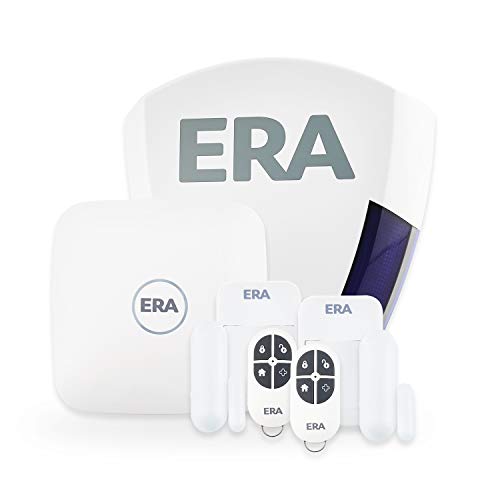
The ERA Protect Alert earns its place because the exact kit includes a live external siren as well as the hub, motion sensor and door contact. A visible siren changes the installation from an indoor notification system into something neighbours can identify from outside. For a buyer who would add a bell box immediately, starting with the complete package is cleaner.
ERA describes the system as wireless, app-controlled and expandable. That makes it suitable for a DIY installation provided you can mount the siren safely and follow the positioning instructions. The motion sensor and single door contact remain starter coverage, not a complete map of a family home, so list vulnerable openings before ordering accessories.
Choose ERA over Ring S when outdoor warning is the priority. Choose Ring instead when you already use Ring doorbells or cameras and want one app. The compromise is that ERA’s ecosystem is less likely to overlap with smart-home devices you already own.
- Buy it if: a live outdoor siren is part of your day-one installation.
- Skip it if: you already have a Ring, Yale or Bosch ecosystem you want to extend.
- Main compromise: the starter sensor count is modest for a multi-entry home.
4. SimpliSafe Two-Camera Kit — Best for optional monitoring

This SimpliSafe bundle is the strongest monitoring-led choice because it combines intrusion sensors with both indoor and outdoor cameras. The cameras give you something more useful than a bare push notification: a way to inspect what is happening before deciding whether an alert is an intruder, a pet or a household mistake.
SimpliSafe says the system is wireless and designed for self-installation, while professional monitoring is optional and contract-free. Its backup design includes battery and mobile-network resilience under the relevant service conditions. Those features suit renters and frequent travellers, but confirm the current monitoring tier and camera features before relying on them; service packages can change independently of the hardware.
The downside is dependence on the subscription for the fullest app and response experience. Buy this bundle because you want its camera-and-monitoring workflow, not merely because it contains more devices than a basic alarm kit.
- Buy it if: you want alarm sensors, cameras and optional professional monitoring in one setup.
- Skip it if: you want every useful feature with no ongoing plan.
- Main compromise: its strongest monitoring and app benefits are service-dependent.
5. Bosch Smart Home Alarm Starter Set — Best for Apple smart homes
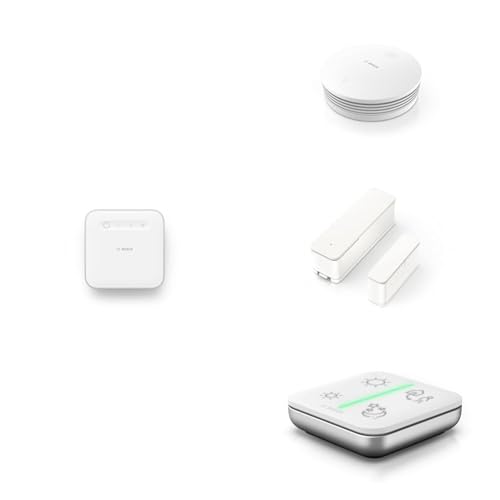
Bosch takes a different route. This starter set combines the Smart Home Controller II, Smoke Alarm II, Door/Window Contact II Plus and Universal Switch II. It is therefore a combined safety and smart-home foundation rather than a ready-made multi-room burglar alarm.
The door/window contact can report opening and vibration, while Bosch says the Smoke Alarm II can join the alarm service and sound during an intrusion event when configured through the controller. Bosch also supports Apple HomeKit for compatible devices through the Controller II. That makes this the most coherent choice here for an Apple household wanting security devices to participate in broader scenes and automations.
Do not mistake breadth for coverage. There is no motion detector in this exact set and only one door/window contact, so a complete intrusion layout requires additions. It suits someone deliberately building a Bosch smart home; it is not the fastest box-to-whole-home route.
- Buy it if: Apple HomeKit integration and connected smoke detection are priorities.
- Skip it if: you want a complete intrusion kit with several contacts and motion sensors.
- Main compromise: it is a smart-home foundation that needs more security accessories.
6. Ring Alarm Pack L — Best for 2–3 bedroom homes

The Ring Alarm Pack L fixes the main weakness of the smaller Ring kit: coverage. Ring specifies a base station, keypad, four contact sensors, three motion detectors and a range extender. That is a far more realistic starting inventory for a two- or three-bedroom home with several accessible openings and ground-floor rooms.
Buying the larger pack also keeps every sensor in one system with the same setup flow, modes and battery reporting. Use the contacts on the doors and windows that are easiest to reach from outside, then place motion detectors across likely routes through halls and living areas. Our guide to smart alarm sensor types explains what each detector can and cannot see.
The same Ring trade-offs apply: cellular backup and Alarm Calls depend on an eligible plan, and the standard pack does not include an outdoor siren. Choose it over the Pack S when you already know you need several extra sensors; choose Yale when subscription-free expansion and multiple security areas matter more than Ring integration.
- Buy it if: you need credible starter coverage for a two- or three-bedroom home.
- Skip it if: you live in a small flat or want a live outdoor siren included.
- Main compromise: the larger sensor count costs more and still leaves outdoor warning as an extra.
How to Choose a Smart Alarm System
Map the entry points before choosing a kit
Count accessible external doors and windows, then mark the rooms an intruder would cross. Door and window contacts detect the first opening; motion detectors cover an area after someone enters. A pack that looks generous may still be wrong if it gives you three motion detectors but only one contact for four vulnerable doors.
Decide who responds to an alert
Self-monitoring is inexpensive and direct, but it assumes you can see the alert, assess it and contact someone. Alarm-call services contact nominated people. Professional monitoring may add verification or escalation, but the exact response depends on the provider and plan. Read the current terms rather than assuming the word “monitored” guarantees police attendance.
Check failure modes, not just app features
Ask what happens during a power cut, broadband outage, flat phone battery or failed sensor. A base-station battery keeps local protection running; cellular backup can preserve alarm communications under a qualifying plan. Neither feature makes cameras work indefinitely during every outage, and backup services vary by brand.
Price the system you actually need
Compare the total layout rather than the starter-box price. Include extra contacts, pet-aware motion sensors, an outdoor siren, key fobs or keypads, replacement batteries and any subscription needed for the features you value. The cheapest box can become the expensive route if it needs six immediate additions.
How Much Alarm Coverage Does Your Home Need?
For a small flat, start with a contact on the main entrance and a motion detector covering the route from that entrance into the home. Ring Pack S fits that brief. Ground-floor flats may need contacts on accessible windows, while upper-floor flats should still consider balcony or shared-access doors.
A two- or three-bedroom house usually needs broader perimeter coverage. Ring Pack L supplies four contacts and three motion detectors, but the exact layout matters more than the bedroom count. Patio doors, side doors, attached garages and low rear windows often deserve attention before upstairs rooms. For more detail, see our guide to choosing a smart alarm for your home.
Outbuildings complicate the decision. Yale’s long-range platform is attractive for a detached garage or shed, but quoted open-field range does not describe performance through masonry, foil-backed insulation or several walls. Test the signal at the intended position before fixing sensors permanently.
- Prioritise: external doors, patio doors and accessible windows.
- Then cover: hallways, landings and rooms connecting likely entry points.
- Add separately: garages, sheds and outdoor sirens only after checking range and weather suitability.
Self-Monitoring, Alarm Calls and Professional Monitoring
Self-monitoring
The system sounds locally and sends an app notification when internet access is available. You check cameras or sensor history, contact someone at the property and decide whether to call the police. This is enough for many occupied homes, but alerts can be missed in meetings, overnight or while travelling.
Alarm calls
Ring describes Alarm Calls as a service that contacts you and nominated emergency contacts when the alarm triggers. That adds persistence without turning the system into a traditional police-connected installation. It still depends on a current eligible subscription and correct contact details.
Professional monitoring
A monitoring centre receives signals and follows its verification and escalation process. SimpliSafe offers optional UK monitoring without a long contract, but response features vary by tier. Our separate comparison of professional and self-monitoring explains who each model suits.
Police response to security systems follows specific confirmation and registration policies; it is not created by an app notification alone. The Home Office crime statistics provide national context, but local risk and police response arrangements should be checked separately. If police-linked response is essential, speak to an accredited installer and your insurer before buying consumer hardware.
Installation, Placement and False-Alarm Control
Install the hub where it has reliable power and network access but is not the first object visible through the front door. Put the keypad on the normal entry route with enough delay to disarm safely. A second keypad or key fob can be useful when the household enters through more than one door; compare compatible options in our smart alarm keypad and panic-button guide.
Fit each two-part contact so the sensor and magnet align when closed and separate cleanly when opened. Check the manufacturer’s maximum gap and surface guidance. Test the door or window several times before relying on adhesive, especially on uPVC frames with mouldings or uneven surfaces.
Motion detectors normally work best across a likely walking route rather than facing directly towards a doorway. Keep them away from radiators, strong sunlight and moving curtains, then use pet settings only within the maker’s stated limits. Our guide to avoiding false smart-security alarms covers placement and sensitivity in more depth.

After installation, trigger every contact and motion detector, test entry and exit delays, check who receives notifications and confirm the siren can be heard where intended. Repeat those checks after app updates, broadband changes and battery replacement. An untested alarm is a collection of assumptions.
Subscriptions, Backup and Smart-Home Compatibility
A subscription may fund cellular backup, calls to nominated contacts, camera recording, professional monitoring or extended device support. Those are different services. Write down the two or three features you actually need and confirm which plan supplies them; do not pay for a broad camera package when all you wanted was broadband-failure resilience.
Battery backup protects against a power cut for a limited period. Cellular backup protects selected communications when broadband fails. Local siren operation may continue without either connection, while app access and camera streaming may not. Ring’s current support material distinguishes its self-monitored functions from subscription-backed Alarm Calls and cellular backup, which is the right level of detail to check for every brand.
Ecosystem compatibility should simplify daily use without weakening security. Ring is the natural fit for Alexa and existing Ring cameras. Bosch offers the clearest Apple HomeKit route in this shortlist. Yale centres control in the Yale Home app and can cover multiple areas or locations. Before committing, read our guide to Apple, Google and Amazon smart-home ecosystems.
Voice control is convenient for arming or checking status, but disarming should remain protected against casual or accidental commands. Use strong account passwords, enable multi-factor authentication where offered and review household access when someone moves out or changes phone.
Which Smart Alarm System Should You Buy?
Choose the Ring Alarm Pack S for a flat or one-bedroom home when you want the clearest all-round mix of keypad control, app alerts, expansion and optional backup services. It is the best smart alarm system UK starting point for most smaller properties, provided one contact and one motion detector match your layout.
For a two- or three-bedroom house, buy the Ring Alarm Pack L rather than pretending the smaller kit is enough. Choose Yale when no required subscription, broad expansion and multiple security areas matter most. Choose ERA when an external siren must be present from day one, SimpliSafe when cameras and optional monitoring drive the decision, and Bosch when Apple HomeKit plus connected smoke detection is the priority.
The biggest mistake is buying by logo and then discovering the box does not cover the property. Count openings, decide who responds, check backup behaviour and price every required accessory before ordering.
Frequently Asked Questions
What is the best smart alarm system in the UK?
The Ring Alarm Pack S is the best overall starting point for most flats and smaller homes because it combines a base station, keypad, contact sensor, motion detector and range extender. Larger homes should start with a pack containing more contacts and motion detectors.
Can a smart alarm work without Wi-Fi?
Local sensors and the siren may continue to work when broadband fails, depending on the system. Remote app alerts and camera access need connectivity unless the system and service plan include suitable cellular backup.
Do I need a subscription for a smart alarm?
Not always. Yale and other systems can provide core app and local alarm functions without a required plan. Subscriptions may add cellular backup, alarm calls, camera recording or professional monitoring, so compare features rather than the plan name.
How many alarm sensors does a three-bedroom house need?
There is no fixed number. Count accessible external doors and windows first, then add motion coverage across likely routes. A ten-piece kit with several contacts and motion detectors is often a more realistic starting point than a five-piece flat kit.
Are wireless smart alarms suitable for renters?
They can be, especially when sensors support removable adhesive mounting. Check the tenancy agreement, follow the manufacturer’s mounting instructions and remember that some outdoor sirens or cameras may need landlord approval or drilling.
Will a smart alarm automatically call the police?
Do not assume so. Self-monitored alerts do not create automatic police response, and monitoring services follow their own verification and escalation rules. If police-linked response is essential, confirm the provider’s current process and any accreditation requirements before buying.